Tools and Processing
Drones and Maintenance
View the real-time status of every aircraft in your fleet to see which drones are Good to Fly, Grounded, or have Maintenance Due. Pilots can create maintenance logs to keep your fleet in top condition, and you can review the full flight history for each drone.
Fleet Overview
Add Drones
Any drone paired with a connected account or uploaded through Nova AirCast will automatically appear in your fleet. To add a drone manually by selecting the Add Drones button in the top right corner. Click the link to Connect Autel and Skydio accounts to automatically pull flight logs.

All Drones
The All Drones dashboard shows your entire fleet, including the number of flights for each drone, its last flight, total flight time, and maintenance status. Select a drone to view its flight history and metrics.


Drone Overview
Edit Details
View or edit the drone’s name, serial number, make, model, purchase date, and warranty by selecting Edit details in the top right corner


Drone Metrics
View Total Flights, Distance Flown, Flight Time, and Average Flight Time.

Calendar View & Most Active Pilots
See the drone’s flight time in a calendar view, along with the pilots who have flown it the most.

Notes and Information
View the drone’s name, serial number, make, model, purchase date, warranty, and firmware version. You can also add notes for pilots to see.

Files
Upload documents like manuals, maintenance logs, and purchase orders so official drone documentation is easy to find.

Drone History
Flight Dashboard
The Flight Dashboard breaks down every flight a pilot has uploaded to Pilot and Fleet Tracking, giving an in-depth view of each flight and its metrics.


Flight Overview
Summary
View the checklist assigned to the flight, the Pilot in Command (PIC), the drone, flight length, battery consumption, and takeoff location.

To change the PIC or drone, hover over the PIC or Drone tag and select the pencil icon.

Flight Statistics
View the flight’s telemetry, including Average Altitude, Max Altitude, Average Speed, and Average Battery Temperature.

Tags and Notes
Add tags to categorize each flight and identify your most common mission types. Pilots can also add notes about the mission.

Custom Fields
Managers can create custom fields for pilots to fill out. Fields can be yes or no questions, text inputs, or multiple choice questions.

Linked Layers
Link a flight’s metrics to the data you’ve processed in a Nova project.


Files
Attach flight authorization checklists or any other documentation that isn’t stored in Nova.

Drone Specific Maintenance
Services
View each drone’s service requirements so you always know its health status and when it needs maintenance.

Drone Specific Maintenance History
View all maintenance and service logs recorded after a drone has been serviced or repaired.

Fleet Maintenance
View all the maintenance policies in place to keep your fleet healthy and up to standard.


Adding a Maintenance Policy
Select the Template button in the top right corner.

Select the service name to rename the policy, and add a description if needed.
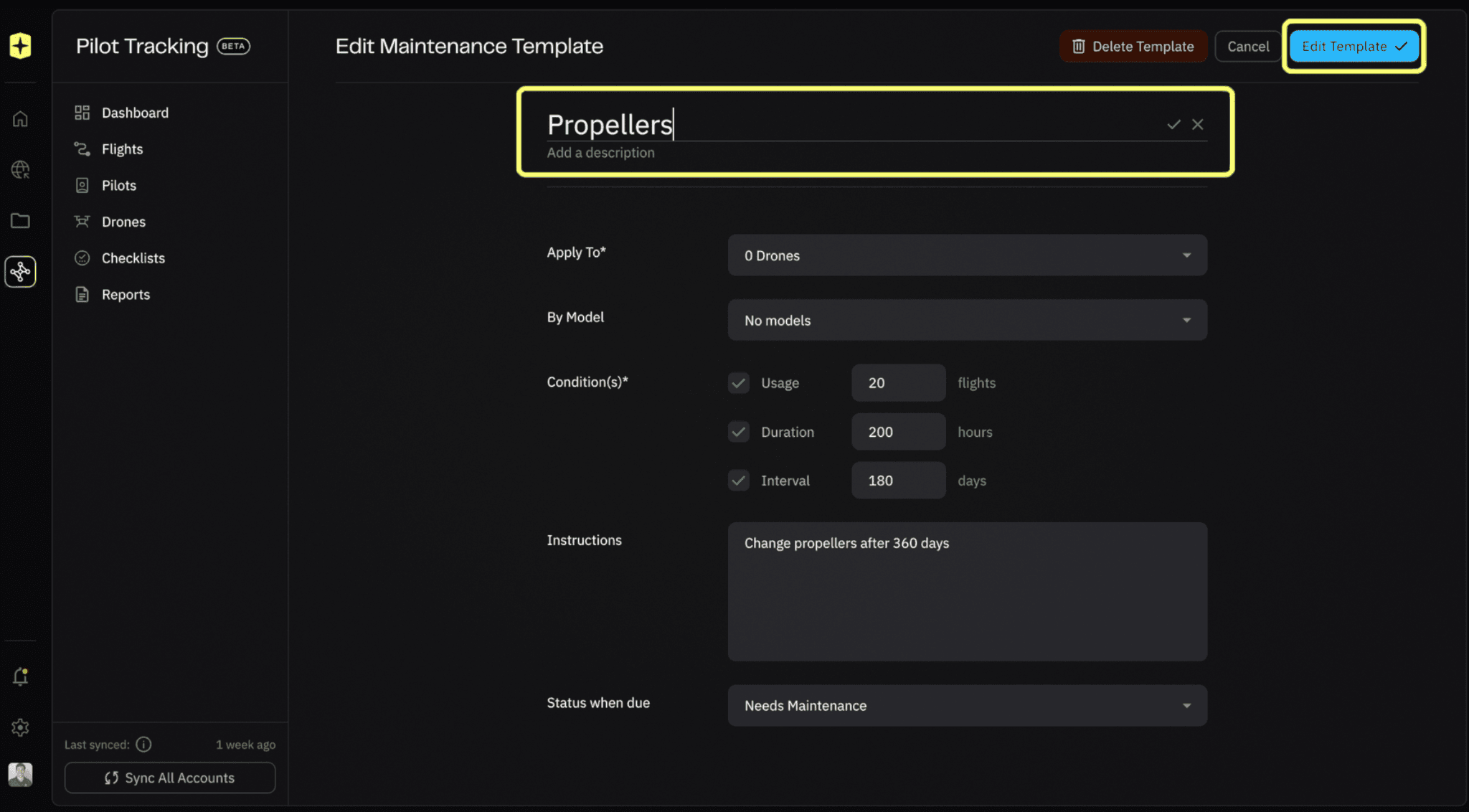
Choose which drones and models the policy applies to, and set the condition that triggers maintenance based on flights, hours, or days.

Add instructions for pilots, including steps, parts, and calibration techniques, so they have an easy walkthrough to follow.

Use Status When Due to set the drone’s status once maintenance is due.

Related to Tools and Processing