Back to blog
Case Study
An Inside Look at What’s Coming Next in Aerial Color Detection
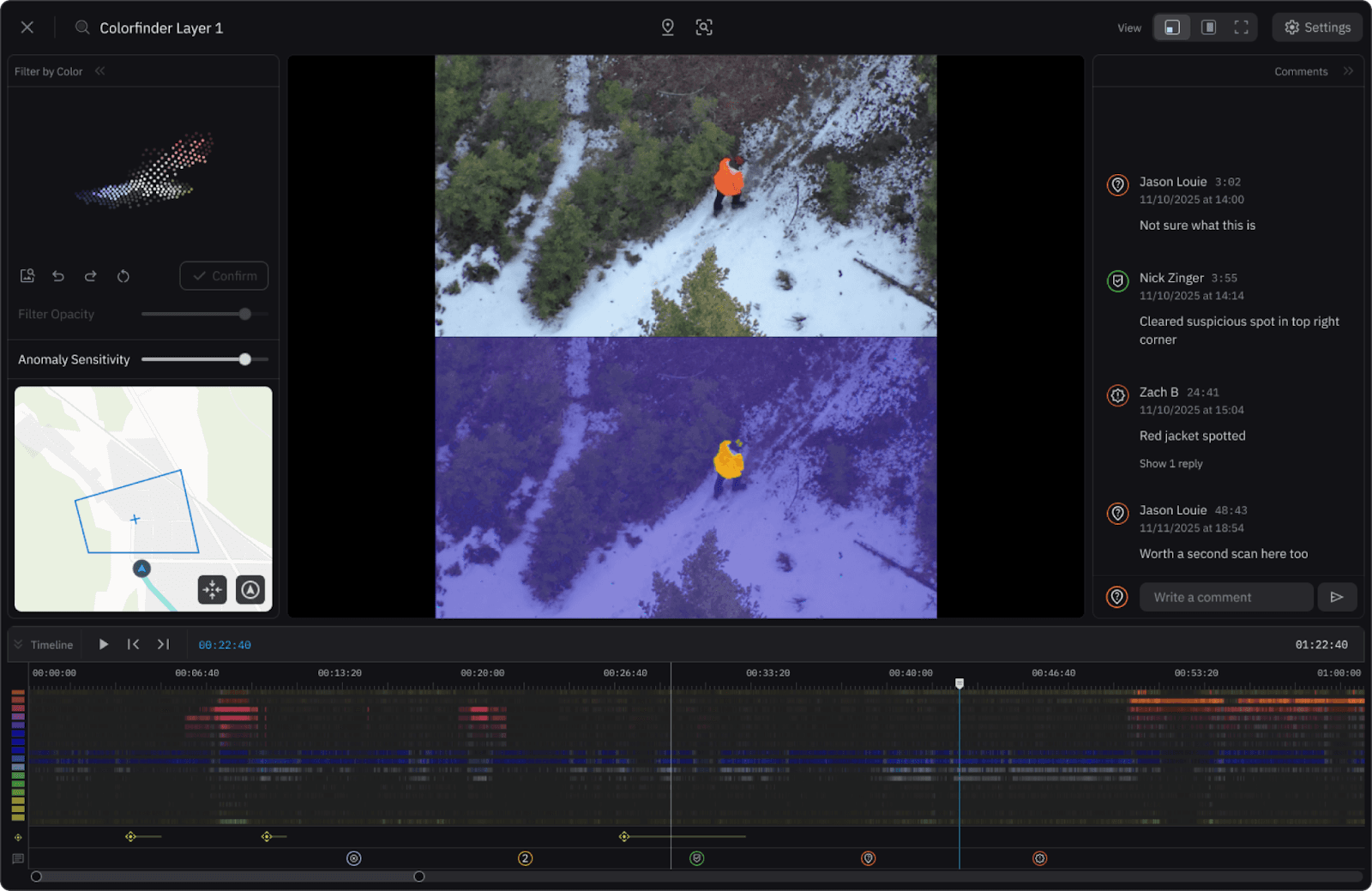
After countless hours of dedicated development, we are actively reimagining one of our most critical tools: Colorfinder. Our goal is to create a next-generation system that doesn’t just detect colors, but truly understands them. The upcoming Colorfinder represents a major leap forward in precision color analysis, collaborative design, and field usability.
Designed for Field Intelligence
The next version of Colorfinder will operate in a dedicated full-screen workspace within your Nova project, offering a distraction-free environment for deep visual analysis. Every feature is being built and tested for the real-world demands of aerial data collection, turning complex imagery into detected anomalies and actionable insights.
Optimal data collection for Colorfinder happens between 200–330 feet, depending on geography and camera systems. Fly too low, and you risk collecting too much irrelevant data. Fly too high, and you might miss crucial anomalies.
And for those working in the field? Colorfinder is optimized for low connectivity environments. As long as you’ve got a minimal connection (just one bar), you can run the algorithm locally on your laptop saving valuable upload time when working with large datasets. This allows efficient analysis in the field which may be ideal for search missions, rural investigations, or disaster-response deployments.

New Features include:
Anomaly Filter
Editor Style Timeline
Commenting
Image Color Picker
Place Point from Image
Zoom on Image
Introducing Smart Color Analysis
Image Color Picker
The new image color picker will make it easy to extract precise color swatches from individual images. Users will be able to pinpoint any hue directly from an image, adjust saturation and brightness, and save it as a reusable color swatch. The selected area will automatically be highlighted with a bounding box, enabling users to filter and search for matching colors across datasets. Teams will also be able to compare against previously uploaded images for consistency or collaborative review.
Anomaly Filter
Traditional color detection struggles in real-world conditions — shadows, glare, and color noise can blur distinctions and hide what matters most. Nova’s Anomaly Filter is being designed to change that.
By analyzing each pixel in context — comparing its values to the pixels around it — Colorfinder will identify subtle irregularities and highlight areas of higher intensity, even when the hue appears identical.
Unlike standard color detection, the new filter will detect shades of white and black, making it exceptional at spotting light objects on dark surfaces and vice versa — perfect for uncovering evidence or clues in complex environments like search-and-rescue or crime scene analysis.
In the video below, the Anomaly Filter detects an anomaly in the bottom-left corner — a white T-shirt rolled up and tossed into the sagebrush off the road. Nearly invisible to the naked eye and undetectable through traditional color analysis, this example highlights the Anomaly Filter’s true strength.
Whether you’re looking for a missing person in mixed terrain, scanning a scene for hidden evidence, or analyzing aerial imagery for out-of-place objects, the anomaly filter is being developed to reveal color patterns outside the normal range, bringing hidden details to the surface.
A Timeline Built for Collaboration
Editor-Style Timeline
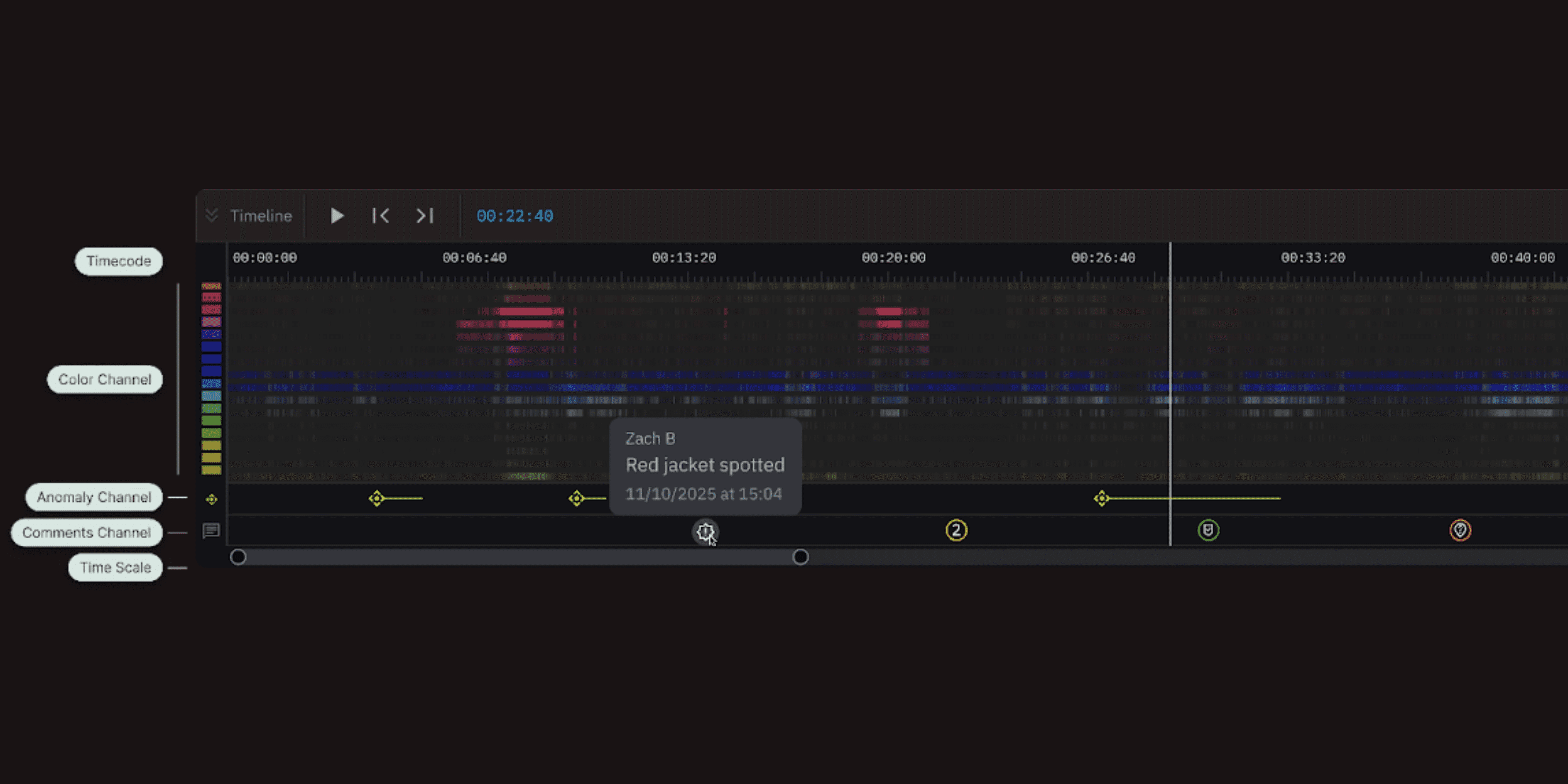
This timeline is being built for collaboration. Colorfinder will now introduce an interactive video timeline built for analytical precision.
View timecodes, color channels, anomaly markers, and comments all at once.
Jump instantly to a specific timestamp.
Expand the timeline to see more detail across color and anomaly channels.
Use the comments timeline to write notes, assign statuses, and reply to teammates directly within the project. Each comment is color-coded to show its status and clicking on a comment can instantly take you to that moment in the video.
Comments & Map Integration
In the upcoming version, users will be able to write notes, assign statuses, and reply to teammates directly within the project. Each comment will be color-coded to show its status, and clicking on a comment will take you instantly to that moment in the video.
Color analysis doesn’t stop at detection. With the new updates coming, users can place points directly on images or anomaly maps, linking visual findings to real-world locations. Combined with the zoom feature, this turns Colorfinder into a powerful investigative map interface letting teams not just see the colors, but understand where and why they appear.
The Future of Visual Intelligence
Colorfinder isn’t just a technical upgrade; it’s a collaboration tool for real teams in the field. The new design will allow teams to share images, color swatches, and notes seamlessly, building a shared understanding of the scene. Whether working from a command center or in the field with a laptop, every user will be able to see the same data, the same anomalies, and the same opportunities for action. Every enhancement reflects our mission: find clues that count.
Finally, we want to extend a sincere thank-you to our clients and field partners. Your feedback, patience, and insights are helping shape this new generation of Colorfinder. You’ve challenged us to make it faster, smarter, and more intuitive — and because of you, it is.
Start for free today.
Craft the future. Respond to the present.